
Best Browser-Based Calling Services Compared

Browser-based calling, meaning phone calls made directly from a web browser without downloading software, has gone from a niche curiosity to a legitimate alternative to traditional phone services. The appeal is obvious: open a tab, enter a number, and call. No app installations, no software updates, no switching devices.
But not all browser calling services are created equal. Some are genuinely useful. Others are ad-supported experiments that technically work but deliver an experience nobody would willingly repeat. We tested seven services to find out which ones are worth your time.
How We Tested
We placed calls to phone numbers in 10 countries across each service, testing connection time (how quickly the call connects after dialing), audio clarity (measured subjectively on a 1-5 scale by both caller and recipient), reliability (did the call connect every time? did it stay connected?), ease of use (signup process, interface clarity, hidden steps), and true cost (including any connection fees, minimum purchases, or hidden charges that inflate the advertised rate).
Each service was tested on Chrome, Firefox, and Safari on both Mac and Windows machines, over both WiFi and mobile hotspot connections.
The Services We Compared
1. BoraPhone: Best Overall
Website: boraphone.com
What it is: A dedicated browser-based international calling service. Sign up with email, add credits (starting at $5), and call any phone number worldwide. Your first call is free with no credit card required.
Our experience: This was the most polished and reliable service in our testing. Calls connected in under 3 seconds consistently. Audio quality was HD-clear on every test call, including calls to mobile numbers in Nigeria and India that gave other services trouble. The interface is clean: enter the number, see the rate, click call.
Standout features: A rate calculator that shows the exact per-minute cost before you dial. No connection fees. Pay-as-you-go with no subscription. Works from any country. Enterprise plan available with call recording, AI transcripts, and team accounts.
Pricing: From $0.02/minute depending on destination. No monthly fee.
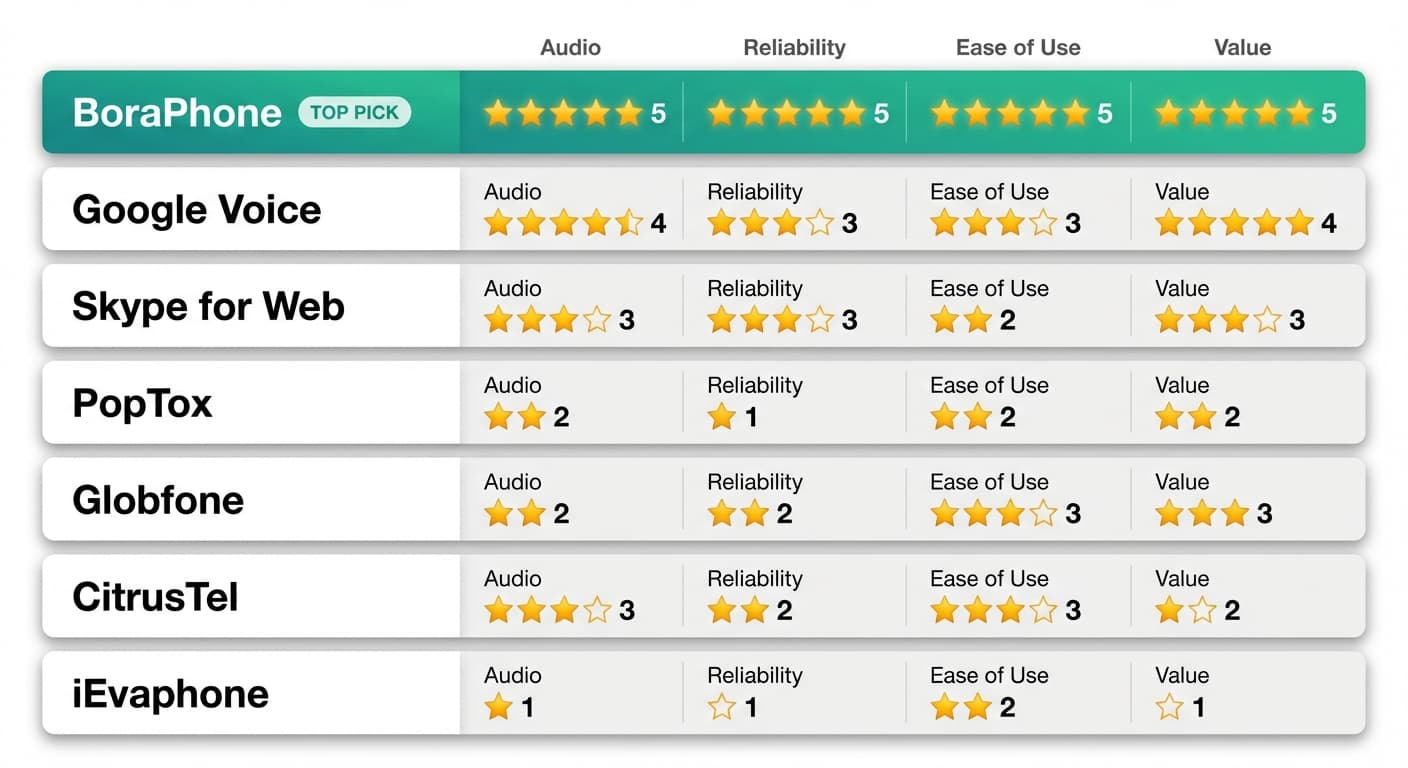
Rating: Audio 5/5 | Reliability 5/5 | Ease of Use 5/5 | Value 5/5
2. Google Voice (Web Version): Best Free Option for US Users
Website: voice.google.com
What it is: Google's free calling service, accessible through a web interface. Free calls to US and Canada, paid international calls.
Our experience: The web version works but feels dated. The interface has not been redesigned in years and is clearly mobile-first, and using it on a desktop browser feels like using an enlarged phone app. Call quality to well-served markets (UK, Canada, Western Europe) was good. Calls to Africa and Southeast Asia were more variable.
Key limitation: Only available to US residents. Blocks international calling from foreign IP addresses. Cannot sign up without a US phone number.
Pricing: Free to US/Canada. International rates from $0.01/min (varies by destination). No connection fees.
Rating: Audio 4/5 | Reliability 3/5 | Ease of Use 3/5 | Value 4/5 (for US users only)
3. Skype for Web: Established but Showing Its Age
Website: web.skype.com
What it is: The web version of Microsoft's Skype, allowing voice calls from a browser with Skype Credit.
Our experience: Skype for Web works, but the web interface is a scaled-down version of the desktop app with reduced functionality. We experienced occasional audio delays (200-400ms latency) that made conversation slightly unnatural. The interface pushes you toward chat and messaging features, so finding the dialer requires navigating through menus.
Key limitation: Requires a Microsoft account and Skype Credit purchase. The $0.05–$0.10 connection fee per call is annoying for short calls. The web version does not support all features available in the desktop app.
Pricing: From $0.02/min plus $0.05–$0.10 connection fee per call. Subscription plans available ($3–$14/month for specific countries).
Rating: Audio 3/5 | Reliability 3/5 | Ease of Use 2/5 | Value 3/5
4. PopTox: Most Well-Known Free Service
Website: poptox.com
What it is: An ad-supported browser calling service that offers a limited number of free calls per day.
Our experience: PopTox was the most frustrating service we tested. The concept is appealing: free browser calls with no signup. In practice, we encountered constant ad pop-ups before, during, and after calls. Call quality was inconsistent: one test call to the UK was acceptable, while a call to India had echo so severe the recipient could not understand us. Free minutes are limited to 1–2 short calls per day (approximately 2-4 minutes total).
Key limitation: Extremely limited free minutes. Aggressive advertising. Poor and inconsistent call quality. Many users report being redirected to sponsored pages after their free minutes run out. Not suitable for anything beyond a quick test call.
Pricing: "Free" (ad-supported, limited minutes). Paid plans are available but poorly documented.
Rating: Audio 2/5 | Reliability 1/5 | Ease of Use 2/5 | Value 2/5
5. Globfone: Functional but Basic
Website: globfone.com
What it is: A free browser calling service that also offers SMS and file sharing. No signup required.
Our experience: Globfone offers a straightforward interface with no registration. Call quality was middling, acceptable for a short conversation but not something you would choose for an important call. Call duration is limited under a fair-use policy, and we experienced two disconnections during a 5-minute test call. The site shows ads but they are less aggressive than PopTox.
Key limitation: Limited call duration. No premium option to improve quality or remove restrictions. Audio quality is below what modern VoIP should deliver.
Pricing: Free (ad-supported, limited duration).
Rating: Audio 2/5 | Reliability 2/5 | Ease of Use 3/5 | Value 3/5
6. CitrusTel: Niche Free Option
Website: citrustel.com
What it is: A free browser-based calling service similar to PopTox and Globfone.
Our experience: CitrusTel offered slightly better audio quality than PopTox but with similar limitations. Free call duration is capped, and the service is only available to limited destinations. The interface is simple and functional. We encountered no aggressive advertising, which was a pleasant surprise compared to competitors.
Key limitation: Very limited destination coverage compared to paid services. Short free call durations. No premium tier for improved quality.
Pricing: Free (limited minutes and destinations).
Rating: Audio 3/5 | Reliability 2/5 | Ease of Use 3/5 | Value 2/5
7. iEvaphone: Bare Minimum
Website: ievaphone.com
What it is: A free browser calling service that offers limited calls without registration.
Our experience: The most bare-bones option we tested. The interface is minimal to the point of feeling unfinished. Call quality was the worst of any service tested, with significant latency, echo, and audio compression that made voices sound robotic. Free minutes are extremely limited.
Key limitation: Very poor call quality. Extremely limited free minutes. No improvement available through paid plans.
Pricing: Free (very limited).
Rating: Audio 1/5 | Reliability 1/5 | Ease of Use 2/5 | Value 1/5
Head-to-Head Comparison
| Service | Cost | Free Tier | Call Quality | Signup Required | Countries Covered | Desktop Optimized |
|---|---|---|---|---|---|---|
| BoraPhone | From $0.02/min | Free first call | HD | Yes (email only) | 180+ | Yes |
| Google Voice | Free US/CA, paid intl | Yes (US only) | Good | Yes (Google + US number) | 200+ | Partial |
| Skype Web | From $0.02 + conn fee | Skype-to-Skype | Decent | Yes (Microsoft account) | 150+ | Partial |
| PopTox | Free (limited) | Yes (1-2 calls/day) | Poor | No | Limited | No |
| Globfone | Free (limited) | Yes | Below average | No | Limited | No |
| CitrusTel | Free (limited) | Yes | Below average | No | Very limited | No |
| iEvaphone | Free (limited) | Yes | Very poor | No | Limited | No |
What We Learned
The browser-based calling market has a clear quality divide. On one side, you have services like BoraPhone that invest in enterprise-grade infrastructure and charge reasonable per-minute rates to sustain quality. On the other, you have free ad-supported services that offer a proof of concept but not a reliable communication tool.
The free services share common problems: severely limited call minutes, inconsistent audio quality, aggressive advertising, and no recourse when calls fail. They work as a curiosity or a last-resort option, but they are not something you would rely on for an important conversation.
The paid services differ in focus: Google Voice is a US-centric tool that happens to offer international calling. Skype is a legacy communication platform adapting (slowly) to the browser era. BoraPhone is purpose-built for international calling from a browser, which shows in the interface design, call quality, and feature set.
Our Recommendation
For reliable, regular international calling from a browser: BoraPhone is the clear choice. The call quality, rate transparency, and zero-download experience are unmatched. Start with a free first call to any destination. If you mainly call from a desktop, our guide to making phone calls from your computer compares browser calling with Phone Link, FaceTime relay, and Google Voice.
For free US domestic calling from a browser: Google Voice, if you are in the US and have a Google account.
For a free test call to see if browser calling works for you: PopTox or Globfone can demonstrate the concept, but set expectations low on quality. Our separate roundup of free calling websites covers what each free site really gives you.
For business or team use: BoraPhone Enterprise with call recording, transcripts, and shared billing.
Frequently Asked Questions
Can I make a phone call from my browser for free?
Yes, services like PopTox and Globfone offer limited free calls from your browser. However, call quality and available minutes are severely restricted. For reliable calls, paid services like BoraPhone offer rates starting at $0.02/minute with a free first call.
Which browser works best for browser-based calling?
Chrome offers the best compatibility across all services due to its WebRTC implementation. Firefox and Edge work well with most services. Safari has improved but occasionally has compatibility issues with some platforms.
Do I need a microphone and speakers?
You need a microphone for the other person to hear you. Most laptops have built-in microphones and speakers that work fine. For better audio quality, use a headset or earbuds, which reduces echo and improves clarity significantly.
Is browser-based calling secure?
Paid services like BoraPhone encrypt all calls. Free ad-supported services may not offer the same level of encryption, and some collect user data to support their ad-funded model. If privacy is important, use an established paid service with explicit encryption.
Comparing rates between services
Advertised rates are the least reliable way to choose between these services, because every provider quotes its cheapest destination as a "from" price. What matters is the rate to the specific country you call, whether that number is a mobile or a landline, and what the provider adds in connection fees and billing rounding.
We break that down in our VoIP rate comparison, and go deeper on the fee fine print in the real cost of "cheap" calling apps.
Last updated: July 2026. All ratings are based on independent testing conducted in Q2 2026. Service quality and features may change, so verify current offerings on each provider's website.

Written by
Serpius DentoSerpius works with communication and customer relations at BoraPhone. With hands-on experience helping users navigate international calling, he writes practical guides based on real conversations with customers worldwide.
Recent Posts
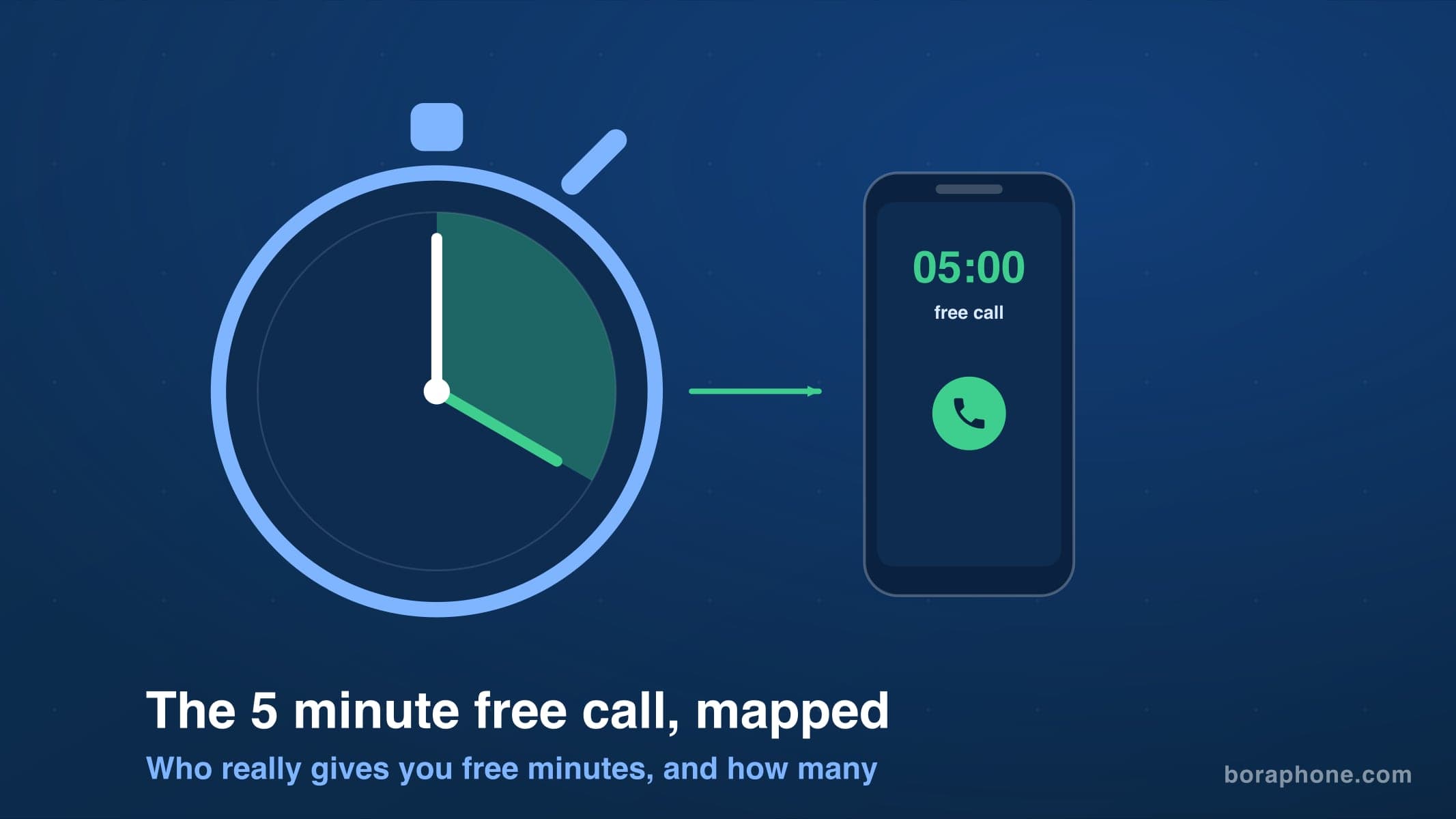
5 Minute Free Call: Where to Actually Get Free Minutes in 2026
Looking for a 5 minute free call online? Here is every service that gives you free calling minutes, how many you really get, and how to make a short free call to any country right now.
How to Call a Phone from Google: Every Option Explained
Can you call a phone number from Google? Yes, several ways: Google Voice, Google Meet, Assistant, and search. Here is how each works, what it costs, and what to use instead when Google says no.
How to Call Internationally Without an App (2026 Guide)
You do not need to download anything to call another country. Browser calling, direct dialing, calling cards, and roaming-free options compared, with real costs for each.